
How to Evaluate a Hospitality LMS
By Janos Laszlo
- hospitality LMS
- LMS evaluation
- software selection
Key takeaways
- A demo shows what a platform does well. An evaluation shows what it does under your own menu, team structure, and reporting needs.
- Six categories cover it: setup and navigation, content authoring, quiz and assessment, reporting and compliance, mobile and learner experience, and fit for hospitality.
- Score each category out of five using your own material, not the vendor’s demo data; the gap between the two is where rollouts fail.
- Fit for hospitality is the category generalist platforms lose on, since menu, recipe, and allergen structures can’t be built out of a generic course tool.
- An independent evaluator scored Pocket Trainer across all six in July 2026, four categories at five out of five, two at four out of five.
Why a demo is not an evaluation
A demo is a rehearsed run-through of a working system loaded with content someone else built. Everything is populated, every screen has data behind it, and the person driving has done it two hundred times.
None of that tells you the three things that decide whether a platform survives contact with a venue:
- Whether your own head chef can build a dish entry without help.
- Whether your GM can pull a completion record for one site without a support ticket.
- Whether a commis chef will open it on a break.
So the evaluation has to be structured, and it has to use your material. Score the same six categories on every platform on the shortlist, and the differences stop being a matter of impression.
What should an LMS evaluation actually cover?
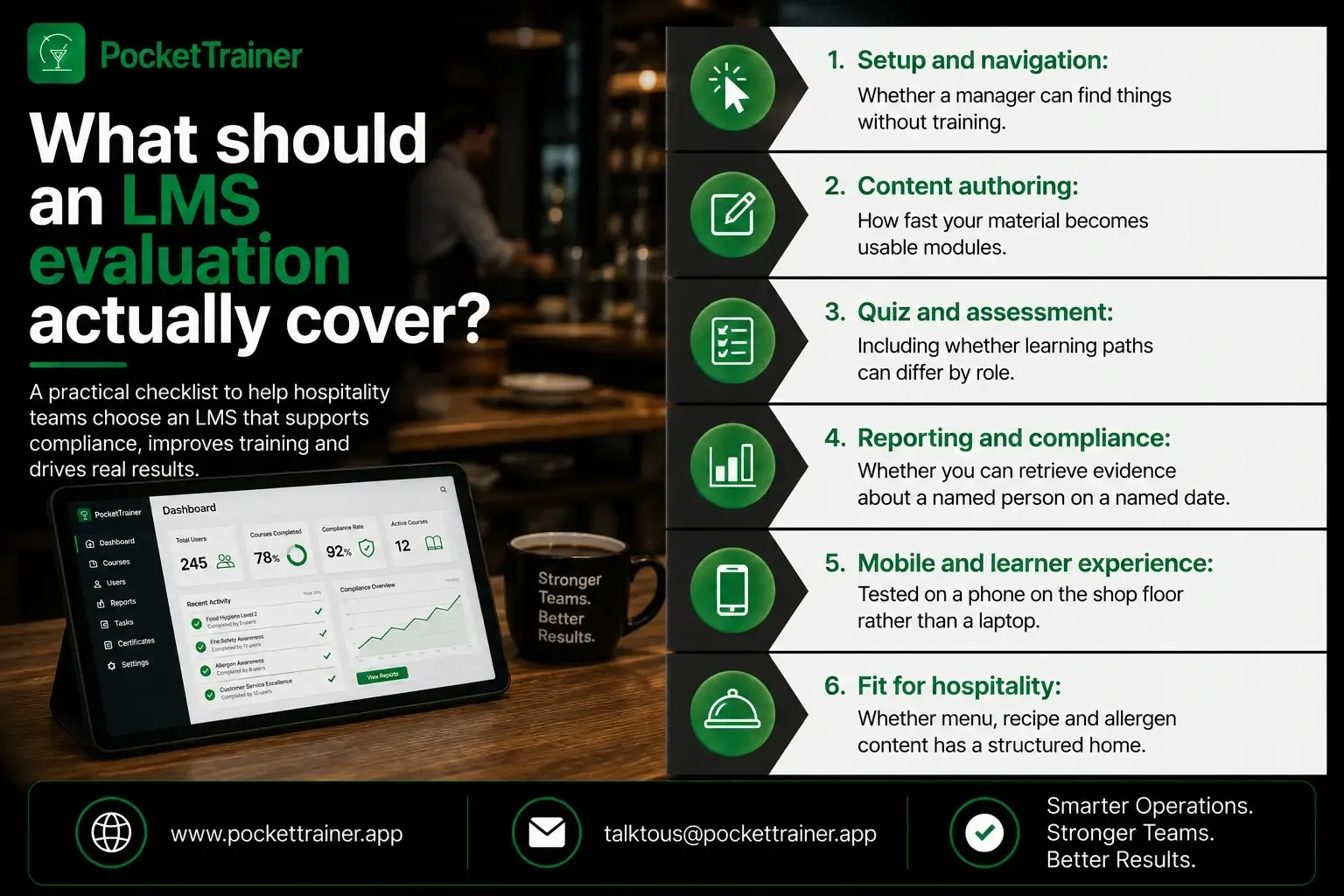
Six categories, scored out of five, using your own menu and team structure rather than the vendor’s demo data:
- Setup and navigation: Whether a manager can find things without training.
- Content authoring: How fast your material becomes usable modules.
- Quiz and assessment: Including whether learning paths can differ by role.
- Reporting and compliance: Whether you can retrieve evidence about a named person on a named date.
- Mobile and learner experience****: Tested on a phone on the shop floor rather than a laptop.
- Fit for hospitality: Whether menu, recipe and allergen content has a structured home.
The six categories worth scoring
What each one is actually testing, and the specific thing to ask for in the session:
Setup and navigation: Can a manager who has never seen the system find a course, a person, and a report inside two minutes? Ask to drive it yourself rather than watch.
Content authoring: Hand them one of your own dishes and one of your own SOPs and ask them to build both, live. Time it. This is the category with the widest spread between platforms.
Quiz and assessment: Ask whether a quiz can be built in minutes, and whether a barback and a sommelier can be given different paths through the same material.
Reporting and compliance: Ask for a completion record filtered by site and by role, produced live, without a manual search. Detail matters here, but so does being able to get a simple answer quickly.
Mobile and learner experience: Open it on a phone, on mobile data, standing up. Look for whether staff can share content with each other, not just receive it from head office.
Fit for hospitality: Ask where a dish with allergens lives, how a new cocktail gets added, and who can edit it. Generalist platforms answer this with a folder of PDFs.
The last category is usually the decider, because it is the one that cannot be retrofitted. Everything else is a matter of degree.
What an independent evaluation found about Pocket Trainer
A training and development manager evaluated Pocket Trainer independently in July 2026, working hands-on with the live platform rather than watching a demo, and scored it across exactly these six categories.
| Category | Rating | Evaluator’s Note |
|---|---|---|
| Content authoring | 5 / 5 | Stand-out recipe and menu builder and native content library; fast to build and assign |
| Quiz and assessment | 5 / 5 | Quick to create; supports personalised learning paths |
| Mobile and learner experience | 5 / 5 | Native app, peer content sharing, calendar and team-culture touches |
| Fit for F&B and hospitality | 5 / 5 | Purpose-built features that most generalist LMS platforms lack |
| Setup and navigation | 4 / 5 | Clean, hospitality-oriented layout |
| Reporting and compliance | 4 / 5 | Genuinely detailed tracking |
The summary line was that Pocket Trainer “stands out for how quickly content can be built and how deep individual staff records go.”
Two categories scored four rather than five, and they are shown here at four. A platform that scores five on everything has been marked by its own marketing department.
On the strengths, the evaluation singled out four things:
- The menu and recipe content builder, called a clear differentiator for F&B training.
- The native content library, for speeding up onboarding of new material.
- Peer-to-peer content sharing, as support for a culture of shared learning rather than top-down courses.
- Rich staff profiles, holding training, quizzes, documents and manager notes in one place, which the evaluation noted is a foundation for appraisals and development plans rather than just course completions.
That last point is the one operators tend to underrate at the evaluation stage and value most later.
Want to run the six categories against us with your own menu?
Book a 15-minute demoOperators describe the same shift when the evaluation is done properly, and the platform then lands.
“It’s very comfortable, very simple. For me, it’s a new era.” - Anastasiia Kachalenko, Receptionist, MIYA, Bulldozer Group
“It’s easy, it’s smarter, it’s faster. And also what is very important is that we are not wasting paper.” - Claudio Brembilla, Supervisor, Signor Sassi
How to run this evaluation yourself
Bring your own material to every session and run the same script on each vendor:
- Bring one dish and one SOP: Ask them to build both while you watch, and time it.
- Bring your org structure: Ask for two different learning paths for two different roles.
- Bring a compliance question: Ask for a completion record filtered by site and role, live.
- Bring a phone: Not the demo laptop. Open it as a frontline user would.
- Score each category out of five immediately: Before the next meeting overwrites the impression.
What you are testing for is whether the platform becomes a habit rather than a launch. That is what the scoring is really predicting:
“We have an exam every month, so we have to open it and study it, we have the food of the week, the wine of the week, the drinks of the week, so it makes them constantly always open it and have a look.” - Sarah Aringo, Floor supervisor, LPM Dubai
“Definitely the Courses.” - Tomas Vega, Regional training manager, LPM
And the simplest measure of whether an evaluation got it right:
“It makes the life of the staff easier.” - Sarah Aringo, Floor supervisor, LPM Dubai
Why reporting deserves its own scrutiny
UK hospitality training platforms are expected to produce evidence about a named person on a named date, not just deliver courses.
Reporting is the category most often waved through in a demo and most often regretted, because in UK hospitality the platform is producing evidence, not just delivering courses.
Three regulators expect you to show something about a named person on a named date:
- Allergens: The Food Standards Agency’s best practice guidance for the out-of-home sector, updated in March 2025, recommends allergen information be “easily available in writing and be underpinned with a conversation”.
- Health and safety: The Health and Safety Executive names the sector’s main risk areas as “slips and trips, knives, manual handling, skin disease”, each carrying a training expectation.
- Alcohol: GOV.UK’s alcohol licensing guidance states that “Anyone who does not hold a personal licence must be authorised to sell alcohol by a personal licence holder”.
Each of those is a record attached to a named person, and named people leave. Score reporting on retrieval speed under a realistic question, not on how many charts the dashboard can display.
The takeaway
Score six categories, use your own material, and write the number down before the next meeting. A structured evaluation turns a shortlist into a decision you can defend to a finance director.
Explore Pocket Trainer After Your Evaluation
Once you have scored the shortlisted platforms, explore how Pocket Trainer’s hospitality LMS supports training delivery, menu knowledge, quizzes and completion reporting. You can also browse the hospitality course library to review the ready-made training available for your team.
When comparing platforms, test the features against your own menu, SOPs and reporting requirements rather than relying on a feature list alone.
Want completion records filtered by site and role, tested on your hardest reporting question?
Book a 15-minute demoFAQs
1. How do you evaluate a hospitality LMS?
Score six categories out of five using your own content rather than the vendor’s demo data: setup and navigation, content authoring, quiz and assessment, reporting and compliance, mobile and learner experience, and fit for hospitality. Run the identical script on every shortlisted platform, and record the score in the room. Impressions fade between meetings; numbers do not.
2. What should I bring to an LMS demo?
One of your own dishes, one of your own SOPs, your role structure and a phone. Ask the vendor to build the dish and the SOP live while you time it, ask for two different learning paths by role, and open the result on the phone rather than the demo laptop. Anything a salesperson cannot demonstrate live should be treated as a no.
3. What is the difference between a hospitality LMS and a general LMS?
Fit for hospitality is the category generalist platforms lose on, because it cannot be retrofitted. A general platform ships courses for every industry and stores your menu as documents. A hospitality platform gives dishes, recipes, allergens, and drinks a structured home that a chef can edit from a phone. Ask where a dish with allergens lives and who can change it.
4. How long should an LMS evaluation take?
One structured session per vendor, plus your own scoring immediately afterwards. Two or three vendors is enough if the sessions are properly structured; more than that and the sessions blur. The work is in preparing the same material and the same script for each, not in the number of meetings.
5. What makes an evaluation worth reading?
Hands-on access to the live platform, a named scope, and a date. Ask which version was tested, how long the evaluator spent inside it, and whether they built something real or watched a demo. An evaluation carried out against your own menu and your own SOP will always tell you more than one carried out against sample data.